Making Tax Digital for Income Tax may apply if you are a sole trader or landlord registered for Self Assessment and your qualifying income is over the threshold for the tax year. GOV.UK sets three steps: over £50,000 from 6 April 2026, over £30,000 from 6 April 2027 and over £20,000 from 6 April 2028. This page is general information from GOV.UK, not tax advice.
The route, stop by stop
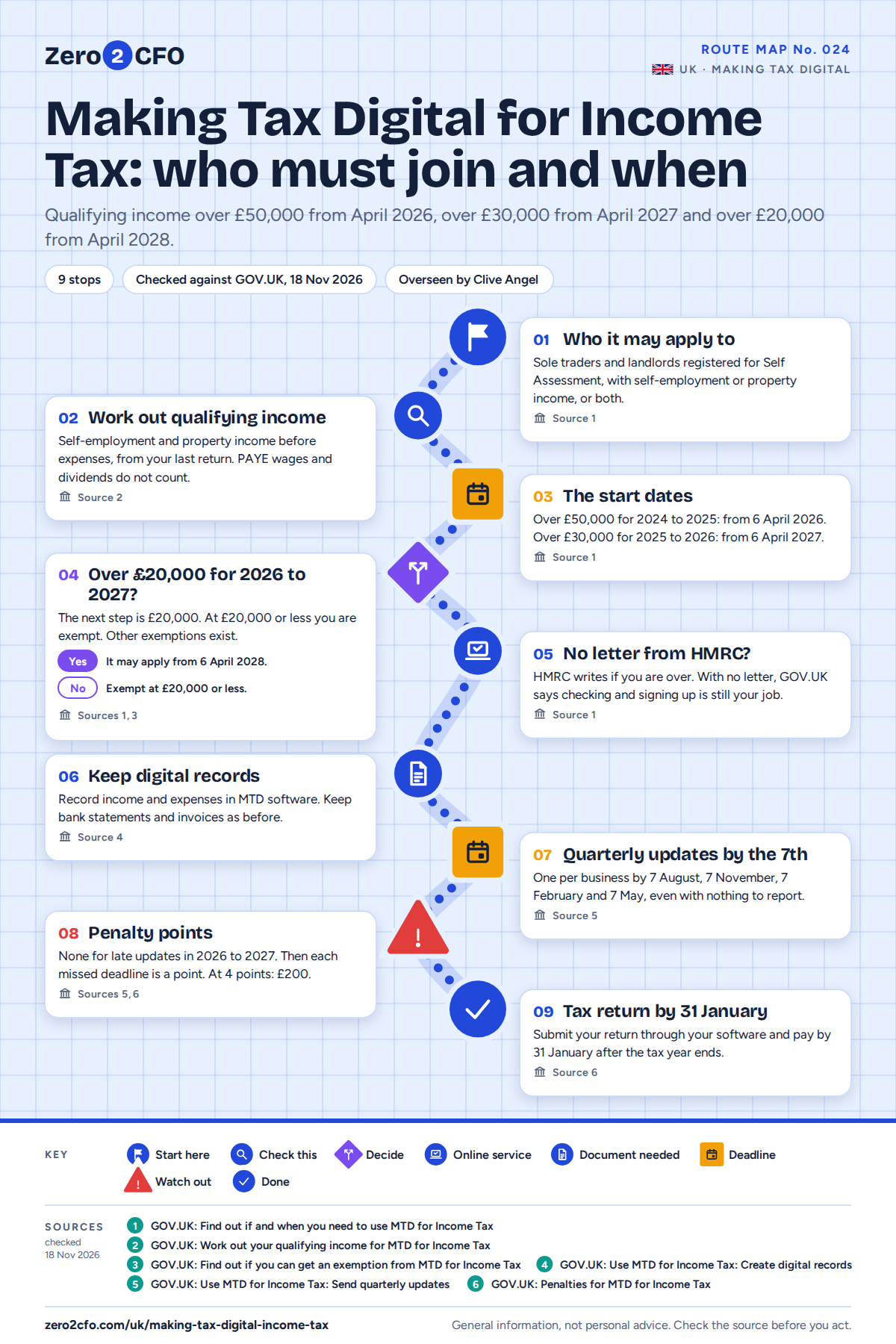
01Who it may apply to
Sole traders and landlords registered for Self Assessment, with self-employment or property income, or both.
Source 1
02Work out qualifying income
Self-employment and property income before expenses, from your last return. PAYE wages and dividends do not count.
Source 2
03The start dates
Over £50,000 for 2024 to 2025: from 6 April 2026. Over £30,000 for 2025 to 2026: from 6 April 2027.
Source 1
05No letter from HMRC?
HMRC writes if you are over. With no letter, GOV.UK says checking and signing up is still your job.
Source 1
06Keep digital records
Record income and expenses in MTD software. Keep bank statements and invoices as before.
Source 4
07Quarterly updates by the 7th
One per business by 7 August, 7 November, 7 February and 7 May, even with nothing to report.
Source 5
09Tax return by 31 January
Submit your return through your software and pay by 31 January after the tax year ends.
Source 6
Who it may apply to
GOV.UK says you need to use it if all three of these are true: you are a sole trader or a landlord registered for Self Assessment, you get income from self-employment or property, or both, and your qualifying income is more than the threshold for the tax year. Partnerships do not need to use it yet. HMRC says it will set out their timeline later.
Qualifying income
Qualifying income is your total income from self-employment and property before expenses. That is your turnover, taken from the tax return you sent for the previous tax year. Wages taxed through PAYE, your share of a partnership's profit, dividends, the State Pension and private pensions do not count.
GOV.UK gives this example. £25,000 of rental income plus £27,000 of self-employment income is £52,000 of qualifying income.
The start dates
| Qualifying income | For the tax year | Use it from |
|---|---|---|
| Over £50,000 | 2024 to 2025 | 6 April 2026 |
| Over £30,000 | 2025 to 2026 | 6 April 2027 |
| Over £20,000 | 2026 to 2027 | 6 April 2028 |
At £20,000 or less you are automatically exempt. There are other exemptions too, for example if you are digitally excluded. GOV.UK lists them.
What changes
If it applies, you keep digital records of your self-employment and property income and expenses in software that works with Making Tax Digital for Income Tax. You still keep your bank statements, invoices and other records as you do now.
Every 3 months you send HMRC a quarterly update for each business. Each one is a summary of the tax year so far, not a tax return. The deadlines are 7 August, 7 November, 7 February and 7 May. If nothing came in or went out in a period, you still send the update.
After the tax year ends, you submit your tax return through your software by 31 January, and pay what you owe by the same date.
Common questions
Will HMRC tell me?
HMRC writes to you if your return shows qualifying income over the threshold. If you do not get a letter, GOV.UK says it is still your responsibility to check, sign up and be ready in time.
Do I still send a Self Assessment return?
Yes, for the tax year before you start. You still submit a Self Assessment tax return for that year in the usual way.
Are there penalties for late quarterly updates?
Not for the 2026 to 2027 tax year. After that, each missed deadline earns a penalty point. At 4 points you get a £200 penalty, and another £200 each time you miss another deadline.
Does my salary count towards the threshold?
No. Employment income taxed through PAYE does not count towards qualifying income. Nor do dividends or pensions.
Is this tax advice?
No. It is general information from GOV.UK pages checked on 18 November 2026. It does not tell you whether Making Tax Digital for Income Tax applies in your case. Rules change, so check the sources or use the HMRC checker before you act.
Where this map sits
UKSelf Assessment
The return, the 31 January bill and the two payments that follow it.
Where the rules come from
- GOV.UK: Find out if and when you need to use MTD for Income Tax checked 18 November 2026
- GOV.UK: Work out your qualifying income for MTD for Income Tax checked 18 November 2026
- GOV.UK: Find out if you can get an exemption from MTD for Income Tax checked 18 November 2026
- GOV.UK: Use MTD for Income Tax: Create digital records checked 18 November 2026
- GOV.UK: Use MTD for Income Tax: Send quarterly updates checked 18 November 2026
- GOV.UK: Penalties for MTD for Income Tax checked 18 November 2026
This map is general information, not personal advice. Rules and rates change, so check the sources before you act. If your situation is tricky, talk to your accountant.
Franchise networks can share this Route Map with their franchisees under their own name. See all the Route Maps for new UK franchisees.